
Auto-Generate Codebase Documentation in 2026

Manual documentation is a debt most engineering teams carry silently. Code ships, features change, and the docs written six months ago quietly stop reflecting reality. For new hires, that gap translates to weeks of lost productivity. For senior engineers, it means constant interruptions. The good news: you can auto-generate codebase documentation today with tools and pipelines mature enough for production use. This guide walks you through the tools, the setup, the pitfalls, and the maintenance practices that keep generated docs accurate and genuinely useful.
Table of Contents
Key takeaways
| Point | Details |
|---|---|
| Docstrings are the foundation | Well-maintained code comments are the raw material that automated tools convert into accurate reference docs. |
| CI/CD integration prevents drift | Regenerating docs on every deploy treats documentation as a build artifact, not an afterthought. |
| Incremental regeneration scales | Re-analyzing only changed files keeps large codebase doc generation fast and cost-effective. |
| Multi-agent pipelines reduce errors | Separating analysis, writing, and review across specialized agents cuts hallucinations significantly. |
| Human review still matters | Automation handles volume; human reviewers catch the context errors that no tool catches reliably. |
How to auto-generate codebase documentation: tools and prerequisites
The industry term for what most developers call “auto-generating docs” is automated documentation generation, sometimes shortened to doc generation or codebase doc generation. The concept is straightforward: tools read your source code, extract structure and comments, and produce human-readable documentation without you writing it manually. Getting there requires three things in place before you write a single config file.
Your code needs docstrings. Every major automated documentation tool depends on structured code comments to produce useful output. Sphinx automatically builds reference docs from docstrings, which means undocumented functions produce empty or useless entries. This is not a limitation of the tool. It is a signal about code quality.
You need version control and a CI/CD pipeline. GitHub Actions, GitLab CI, or any equivalent gives you the trigger point to regenerate docs on every push or merge. Without this, automation becomes a manual step that developers skip under deadline pressure.
You need to choose a documentation generator for developers that fits your stack. Here is a comparison of the most commonly used tools:
| Tool | Language support | Automation level | Cost | Best for |
|---|---|---|---|---|
| Sphinx | Python (primary) | High, docstring-driven | Free | Python projects with structured docstrings |
| Flight Manual | TypeScript | Deterministic, schema-driven | Free (MIT) | TypeScript APIs needing build-time doc generation |
| open-auto-doc | Multi-language | AI-driven, incremental | Free (open source) | Teams wanting full AI-generated doc sites |
| Documint | Multi-language | AI with diagram generation | Paid tiers | Architecture-heavy projects needing C4 diagrams |
-
Sphinx is the most established option for Python projects, with a large plugin ecosystem.
-
Flight Manual regenerates API docs deterministically from TypeScript schemas on every deploy, at zero cost.
-
open-auto-doc uses an AI pipeline to read code structure and produce complete documentation sites, with support for incremental regeneration.
-
Documint goes further by generating multi-level C4 architecture diagrams directly from code analysis, without any manual diagram input.
Pro Tip: Before selecting a tool, audit your codebase for docstring coverage. A repo with 20% docstring coverage will produce sparse, misleading docs regardless of which tool you choose. Spend a sprint improving coverage first.
Setting up your automated doc generation pipeline
Once your tooling is selected, the setup follows a predictable pattern. Here is how to get a working pipeline running with open-auto-doc as the example, since it covers the most common use case for multi-language AI-driven generation.
Step 1: Install and initialize the tool.
"``bash pip install open-auto-doc open-auto-doc init
The `init` command walks you through an interactive setup, asking for your repository path, output directory, and preferred documentation structure. This produces a config file you commit alongside your code.

**Step 2: Run your first full generation.**

```bash
open-auto-doc generate
This analyzes your entire codebase and produces a multi-section documentation site. Expect this to take several minutes on larger repos. The output includes API references, module overviews, and usage examples extracted from your code structure and comments.

Step 3: Switch to incremental mode for ongoing updates.
For large codebases, incremental updates that analyze only changed files vastly improve performance and developer experience. Run:
open-auto-doc generate --incremental
This re-analyzes only files modified since the last run, cutting analysis time and cost on AI-powered tools significantly.
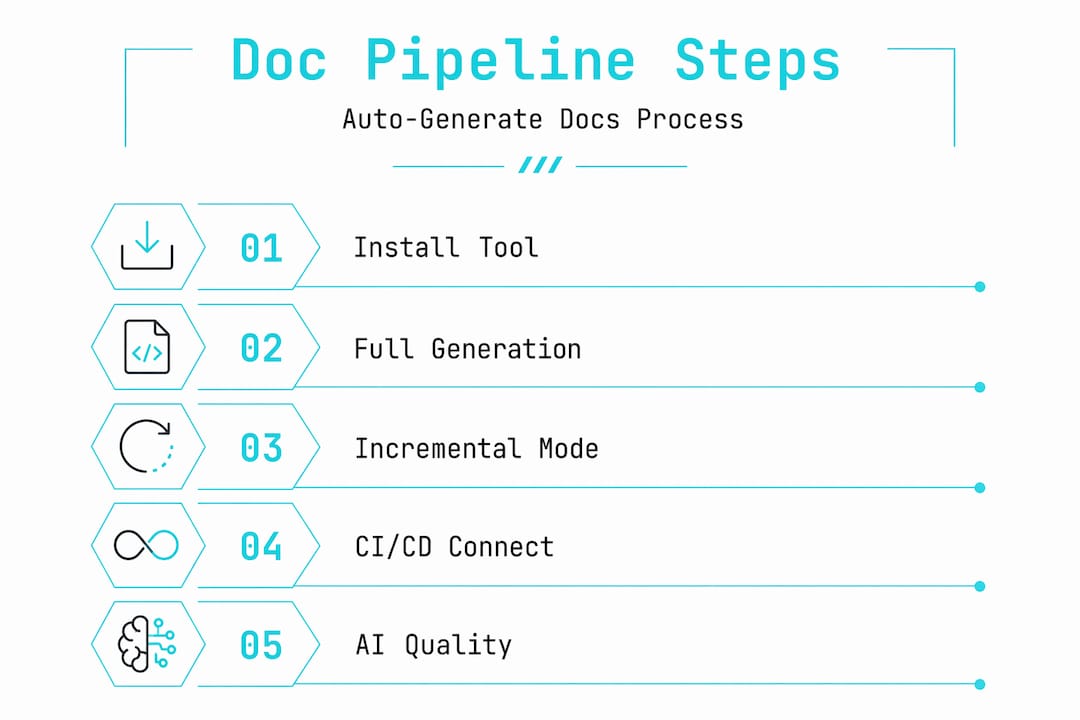
Step 4: Connect to your CI/CD pipeline.
Add a GitHub Actions workflow file at .github/workflows/docs.yml:
name: Generate Docs
on:
  push:
    branches: [main]
jobs:
  docs:
    runs-on: ubuntu-latest
    steps:
      - uses: actions/checkout@v3
      - name: Install open-auto-doc
        run: pip install open-auto-doc
      - name: Generate docs
        run: open-auto-doc generate --incremental
      - name: Deploy docs
        run: open-auto-doc deploy
This triggers doc regeneration on every push to main. Treating doc generation as an idempotent build step integrated into CI/CD ensures your docs never drift from source code. The same principle applies whether you use Sphinx, Flight Manual, or any other tool.
Step 5: Add AI-powered quality layers.
If you are using an AI-driven pipeline, consider a multi-agent architecture. The Zeppelin Labs Orchestrator-15 approach uses parallel writing agents and sequential formatting to enforce correctness and quality control. You separate the Analyzer agent (reads code), the Writer agent (produces prose), the Formatter agent (applies style), and the Reviewer agent (checks accuracy). Each agent has a single responsibility, which limits the blast radius of any single failure.
Pro Tip: Commit your generated docs to a separate branch or deploy them to a hosted platform rather than mixing them with source code. This keeps your main branch clean and makes doc history independently reviewable.
Common mistakes that break automated documentation
Even well-configured software documentation automation pipelines produce poor results when certain practices are missing. These are the failure modes teams hit most often.
-
Skipping the reviewer stage. AI-generated docs can produce plausible but incorrect API signatures. Separating responsibilities across AI agents reduces hallucinations, but a reviewer agent or a periodic human review pass is still necessary to catch what automation misses.
-
Ignoring docstring quality. The docstring-first workflow only works when docstrings are accurate and consistent. Stale or missing docstrings produce stale or missing documentation. No tool can invent accurate context that is not in the code.
-
Running full generation on every commit. On large repos, this is slow and expensive. Use incremental mode for routine commits and reserve full generation for major releases or scheduled weekly runs.
-
No style guide or template. IBM’s 2025 research highlights that AI-generated documentation requires style templates and technical context to produce consistent, high-quality output. Without a template, different modules end up documented in inconsistent formats, which makes the docs harder to read than no docs at all.
-
Broken CI/CD integration. A pipeline that fails silently means your docs stop updating without anyone noticing. Add explicit failure alerts and test your doc generation step in a staging environment before relying on it in production.
The most common failure mode is not a bad tool choice. It is treating documentation generation as a one-time setup rather than an ongoing build discipline. Docs that are not regenerated regularly are not automated docs. They are a snapshot that ages badly.
Keeping your generated docs accurate over time
Getting docs generated is the first milestone. Keeping them accurate is the harder, more important one. Here is how to build maintenance into your workflow rather than bolting it on later.
Automate architecture diagrams alongside text docs. Documint generates multi-level C4 diagrams from code analysis, outputting System Context, Container, and Component diagrams in Mermaid format. Embedding these in your generated docs gives new engineers a visual map of the system without anyone drawing it manually.
Validate docs against source code. Some teams write lightweight tests that check whether documented functions still exist in the codebase. This catches the case where a function is renamed or removed but the docs still reference the old signature.
Use AI assistants to query your generated docs. Once your docs are generated and hosted, an AI chat layer that understands your specific codebase adds significant value. Engineers can ask questions like “which module handles payment retries?” and get answers with exact file references rather than searching manually.
| Maintenance practice | Frequency | Benefit |
|---|---|---|
| Incremental doc regeneration | Every commit to main | Prevents drift between code and docs |
| Full doc regeneration | Weekly or on major releases | Catches structural changes incremental mode misses |
| Human review pass | Monthly | Identifies context errors automation cannot catch |
| Architecture diagram refresh | On major refactors | Keeps system diagrams aligned with actual structure |
| AI assistant validation | On demand | Surfaces gaps in doc coverage through real usage |
Pro Tip: Assign doc review as a rotating responsibility rather than leaving it to one person. When everyone on the team reviews docs occasionally, coverage gaps get caught faster and the docs become a shared artifact rather than one person’s burden.
Treating your docs as code artifacts that require the same discipline as the code itself is the mindset shift that separates teams with reliable documentation from teams that perpetually plan to fix their docs later.
My take on automated documentation workflows
I have seen a lot of teams approach documentation automation with the wrong expectation. They assume that pointing a tool at a repo and running a command will produce docs they can hand to a new hire on day one. Sometimes that works. More often, the output is technically accurate but contextually useless.
What I have learned is that the quality of your generated docs is a direct reflection of the quality of your code hygiene. Teams with consistent naming conventions, clear function boundaries, and maintained docstrings get excellent results from automated tools. Teams with legacy spaghetti get generated docs that accurately describe spaghetti.
The multi-agent pipeline approach is genuinely useful, but only when you treat it as a discipline rather than a magic fix. Separating the Analyzer, Writer, and Reviewer into distinct agents with explicit schemas and failure modes is not complexity for its own sake. It is the difference between docs you can trust and docs you have to double-check every time.
My strongest recommendation: start with incremental regeneration in CI before you worry about AI quality layers. Get the pipeline running, get docs deploying automatically, and then layer in quality improvements. Teams that try to build the perfect pipeline before shipping anything useful end up with neither. The costs of missing documentation compound every week you wait.
The future of this space is AI assistants that understand your specific codebase and answer questions with file-level precision. That is already possible today. The teams that invest in the underlying doc generation pipeline now will be the ones who benefit most from those tools.
— SupaX
See your codebase documented in under two minutes
If you want to skip the pipeline configuration and get directly to accurate, hosted documentation for your private repositories, Shipdocs is built for exactly that.
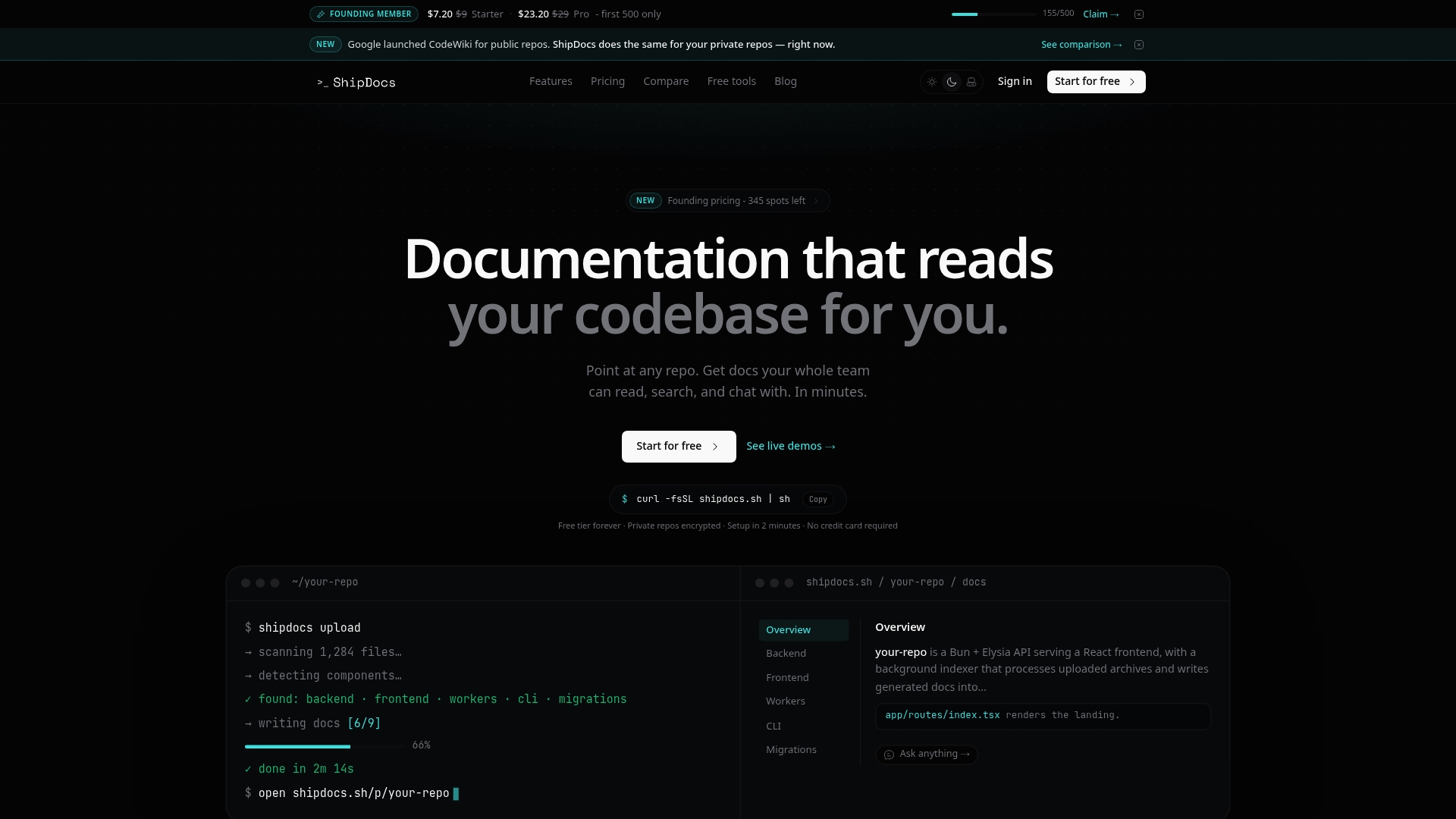
Shipdocs automatically generates documentation for private repos using AI that reads your actual code structure, not just your README. The average generation time is just over two minutes. Beyond the docs themselves, Shipdocs includes an AI chat assistant that answers questions about your codebase with exact file references, which means engineers and non-technical stakeholders can get answers without pulling someone away from their work. You can also explore the full suite of AI documentation tools Shipdocs offers, including automated README generation and architecture overviews. If you want to see what your codebase looks like documented before committing, the real-world examples in the showcase are worth a look.
FAQ
What is the fastest way to auto-generate codebase documentation?
The fastest path is using an AI-powered tool like open-auto-doc or Shipdocs, which analyze your code structure directly and produce a complete documentation site without manual writing. Shipdocs averages just over two minutes for full generation on private repositories.
Do I need docstrings to generate code documentation automatically?
Most automated documentation tools rely on docstrings to produce accurate API references. Tools like Sphinx build directly from docstrings, while AI-driven tools can infer some context from code structure, but consistent docstring coverage always improves output quality.
How do I prevent my auto-generated docs from becoming outdated?
Integrate doc generation as a CI/CD build step that runs on every merge to your main branch. Treating doc generation as an idempotent build step in your deploy workflow is the most reliable way to prevent docs from drifting from source code.
What causes hallucinations in AI-generated documentation?
AI documentation tools hallucinate most often when code structure is ambiguous or when a single agent handles too many responsibilities. Using structured JSON schemas and explicit failure modes in multi-agent pipelines significantly reduces this problem.
Can automated documentation tools handle monorepos?
Yes, most modern documentation generators support monorepos, though configuration varies by tool. Incremental regeneration modes are particularly valuable in monorepos because they limit re-analysis to the packages that actually changed, keeping generation time manageable.